
Practical Guide for Business owners to get started on Shopify in 2027
1. Is Shopify still worth it in 2027?
With so many platforms out there like WooCommerce, Wix, custom builds; is Shopify genuinely still the gold standard for a growing brand? Shopify is the ideal e-commerce platform for any business team which does not have a dedicated developer or IT personnel. Shopify is business focused first with easy to manage order tracking, product management, very easy theme customization and with the recent addition of Shopify Sidekick which can do many minor tasks effectively without you needing to hire a developer to make basic changes to the storefront like changing the color of a button, adding new images to the website and explaining to you the process of how a system works on Shopify.
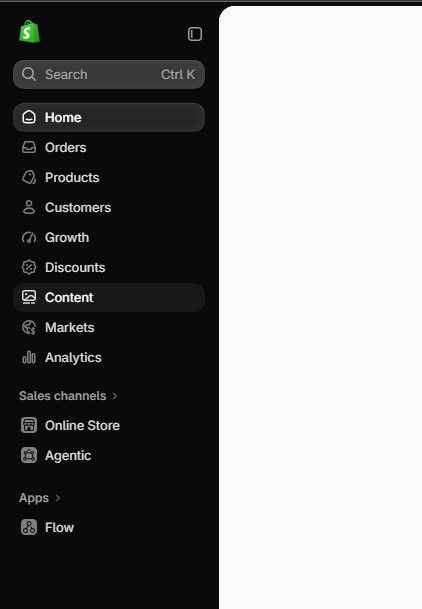
The Shopify Dashboard is straight to the point and very easy to understand and learn.
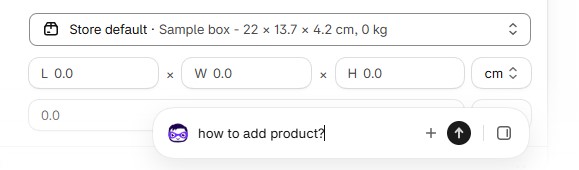
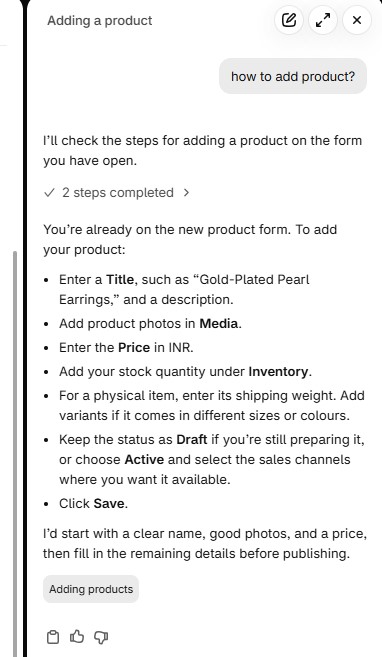
You can ask the shopify sidekick for any queries on how to perform certain actions as if you are using ChatGPT but which is aware of your shopify store and can give you personalized responses based on the status, information of your store. Sidekick can also perform certain actions on behalf of you when asked to do so.
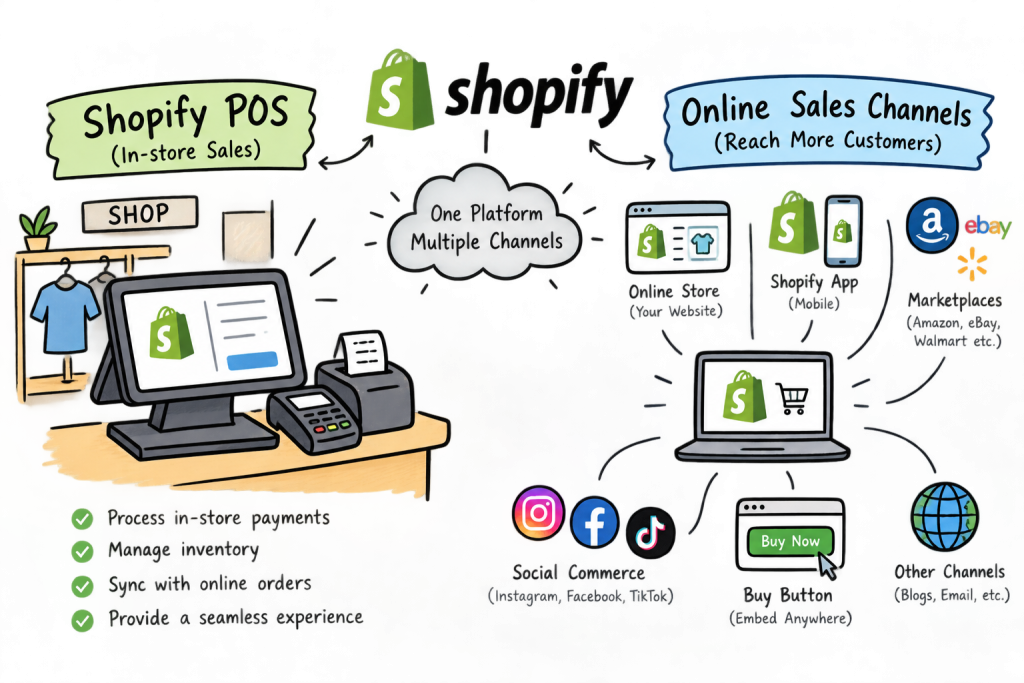
For modern merchants, managing these disparate touchpoints used to require complex web-hooks, clunky third-party plugins, and endless data reconciliation. Shopify bridges this divide by natively integrating point-of-sale (POS) hardware and online sales channels with centralized inventory management. Whether a product is purchased at a pop-up market, a global web storefront, or a wholesale portal, inventory levels update instantaneously across the entire architecture, eliminating overselling and drastically reducing operational overhead.
1.2 The Purpose of This Guide
This Guide is created with the purpose of answering business owners and stake holders queries regarding making an E-commerce store on Shopify or migrating to Shopify. As building a thriving e-commerce business requires more than just launching a pretty template; it demands a strategic foundation designed to scale without accumulating technical debt. This practical guide serves as an end-to-end roadmap for business owners, founders, and operators to architect, launch, and accelerate their growth on Shopify. From selecting the right plan and configuring automated workflows to optimizing for search engines and maximizing conversion rates, you’ll find actionable insights to turn your vision into a high-performing digital enterprise.
1.3. Choosing Your Setup Strategy: From Concept to Storefront
Before touching a line of code or uploading a product catalog, you need to decide how your store comes to life. Depending on whether you are validating a brand-new idea or migrating an existing brand, Shopify offers flexible pathways to get you operational fast:
- For New Concepts & Ideation: If you are still shaping your product line or testing market viability, you can utilize built-in Shopify themes, explore sample starter catalogs, or generate full store previews to visualize your aesthetic and layout before committing to a paid subscription on Shopify.
- For Established Businesses & Migrations: If you are moving over from WooCommerce, Magento, Wix or custom legacy systems, your priority shifts to clean data migration—mapping products, customer accounts, and historical order data while implementing strict 301 redirects to preserve your hard-earned SEO authority.
Check out another article that shows “How to migrate from Instamojo to Shopify”. The platform must be different but the process is the same for any migration to Shopify.
2. Can I learn Shopify from scratch?
Yes, you can absolutely learn Shopify from scratch! It is designed to be simple for business owners with no coding experience, allowing you to handle the vast majority of your day-to-day store operations all by yourself.
Shopify also features Sidekick, an AI assistant ready to help explain processes or perform tasks whenever you need guidance. While major customizations may still require a developer; and for those, it is always best to choose a certified Shopify Partner for top-tier service and support; you can rest assured that learning Shopify from scratch and managing your daily store operations is completely within your reach!
2.1 Can an AI tool like ChatGPT actually build me a functional Shopify store?
ChatGPT cannot directly build you a fully functional Shopify store on its own, but it is a great tool to help you get started. It can provide valuable feedback and give you a blueprint of the exact sections you need for your website, which you can then easily build using Shopify’s built-in online store templates.
For a bit more customized help along the way, you can use Shopify’s AI assistant, Sidekick. However, because both ChatGPT and Sidekick are AI tools, they can sometimes make mistakes and cannot handle complex business logic or advanced theme customization. For those more intricate tasks, you will still need a human developer, and it is always best to choose a certified Shopify Partner for proper guidance, consultation, and quality service.
Choosing an e-commerce platform in 2027 is about more than just setting up a pretty storefront; it is about selecting an engine designed to eliminate operational friction and accelerate growth. Shopify has cemented its market leadership by combining enterprise-grade performance with out-of-the-box simplicity.
Understanding what sets Shopify apart helps founders and operators leverage the platform’s full potential from day one:
2.2 Infrastructure & Conversion Engine
- Shop Pay & Core Web Vitals: Checkout speed is the ultimate conversion lever. Shopify’s infrastructure delivers industry-leading checkout conversion rates—supercharged by Shop Pay, which drastically reduces friction for returning buyers. Paired with strict adherence to Core Web Vitals, your store loads lightning-fast on mobile and desktop without requiring custom performance engineering.
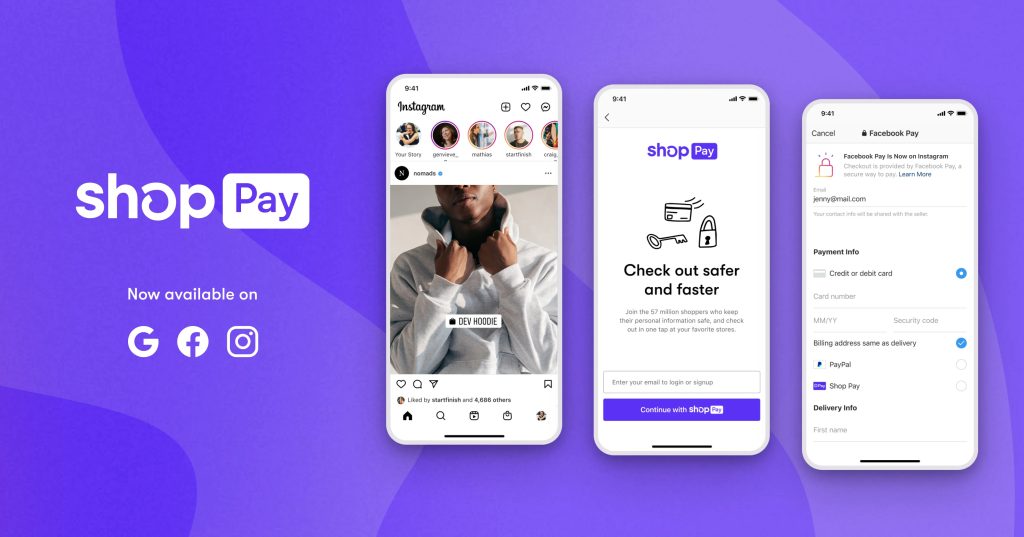
Shopify Shop pay feature
- Native Global Expansion: Expanding internationally no longer requires spinning up fragmented regional storefronts or dealing with currency conversion spreadsheets. Shopify Markets handles multi-currency pricing, localized language translation, automatic local tax and duty calculations, and cross-border shipping rules seamlessly from a single dashboard.
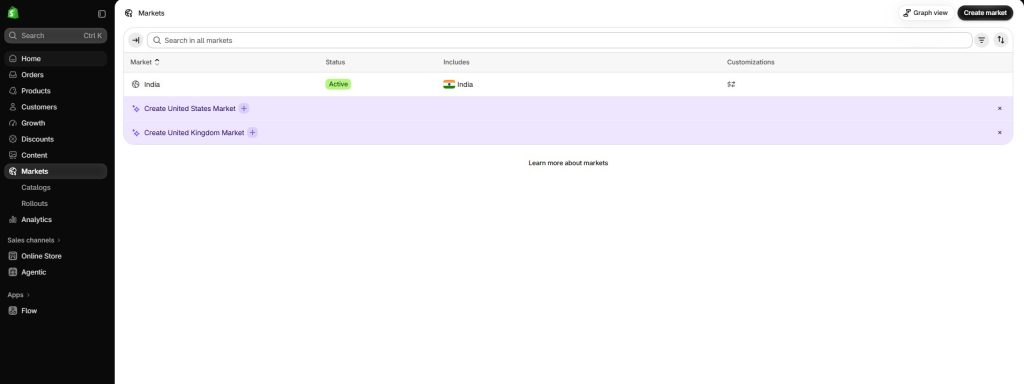
Set up cross-border sales, regional pricing, and international delivery rules from a single centralized dashboard.
Go to the “Markets” tab and then create the markets you want to sell your products to.
2.3 How do I handle complex regional taxes, compliance, and multi-currency payouts without hiring a full-time accountant?
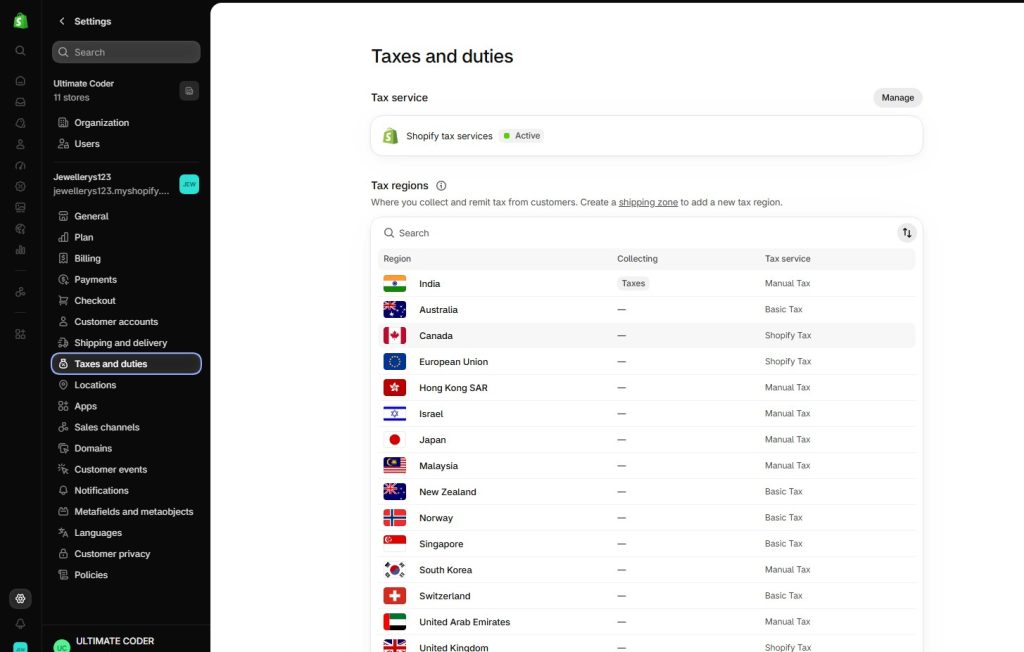
Yes, it is entirely possible to manage regional taxes and multi-currency pricing using only Shopify’s built-in features without installing third-party apps. With Shopify Markets, you can enable local currency display and automatic currency conversions at checkout natively, while Shopify’s built-in tax engine handles region-specific sales tax calculations and tax registration rules automatically right from your admin dashboard.
However, while native tools handle daily calculations and currency conversions seamlessly, they do not automatically file tax returns with local governments or generate strict custom invoices required by certain jurisdictions. For basic multi-currency selling and accurate tax collection, Shopify’s built-in settings are more than enough to operate smoothly on your own without an accountant or apps, though you can always consult a certified Shopify Partner if you run into unique compliance edge cases.
2.4 How do I prevent my app stack from turning into a monthly subscription money pit?
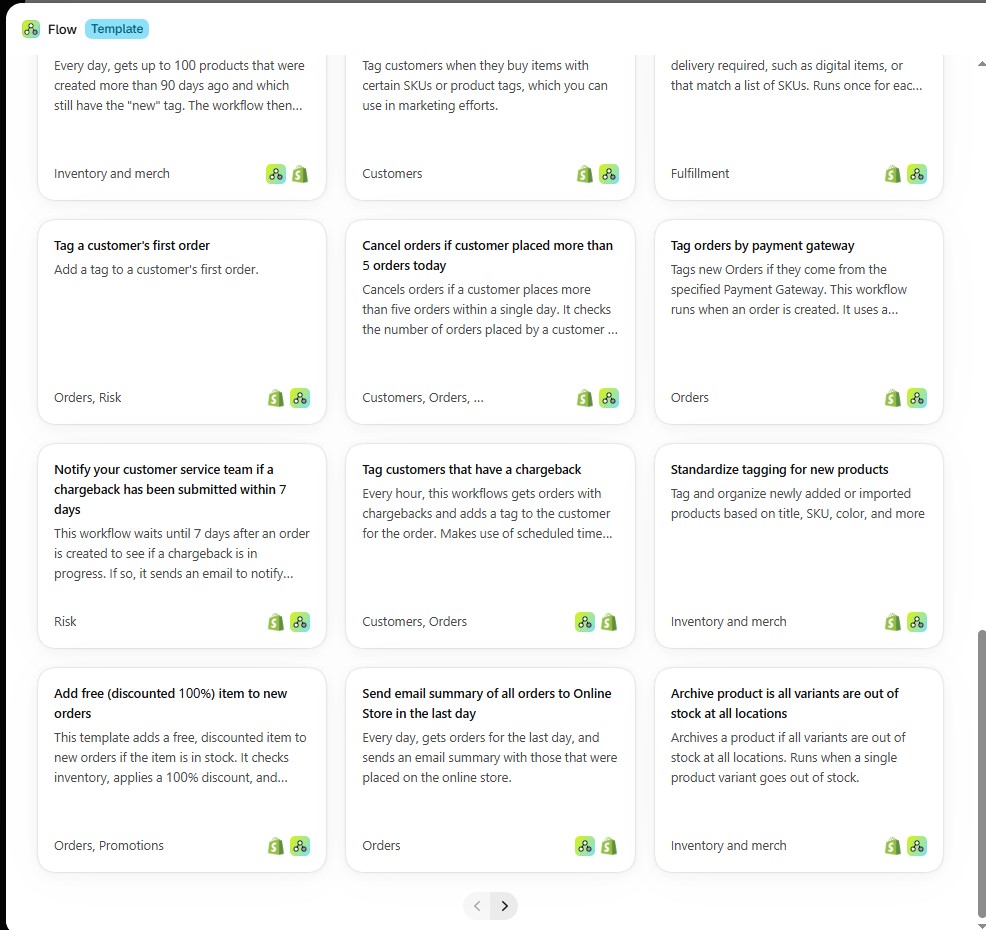
Preventing your app stack from turning into a monthly subscription money pit starts with prioritizing Shopify’s native features before looking at third-party apps. Many features that merchants typically subscribe to apps for—such as basic product reviews, simple discount rules, or fundamental email marketing flows—are already built directly into Shopify’s core platform or free first-party tools like Shopify Email and Shopify Forms. Always exhaust what is included natively in your store before adding a paid app to your stack.
A powerful way to cut software costs is by using Shopify Flow, which can effectively replace expensive third-party subscription tools like Mailchimp, Zapier, and other workflow automation apps. Shopify Flow allows you to build custom automated workflows directly within your store for free. While there is a slight learning curve to setting up custom logic from scratch, Flow provides a large library of pre-built, automated workflow templates that you can instantly import and use at no extra charge. For particularly complex automation logic, technical expertise may be required, so hiring a certified Shopify Partner developer can help you build and execute advanced workflows seamlessly without any issues.
Finally, be ruthless about auditing your software stack on a regular quarterly basis. Check your analytics or dashboard metrics to see if paid apps are genuinely generating a positive ROI or saving enough manual labor to justify their recurring monthly cost. If an app is only used occasionally or fails to pull its weight, cancel the subscription immediately. Whenever third-party tools are necessary, opt for apps with flat-rate fees rather than tiered pricing that scales up aggressively as your order volume grows.
2.5 Unified & Hybrid Commerce
- Omnichannel Native (Shopify POS): For brands bridging the digital and physical worlds, Shopify POS provides true omnichannel synchronization. Inventory levels, customer profiles, gift cards, and sales data update in real time whether a transaction happens at a pop-up market, a permanent brick-and-mortar boutique, or your online store.
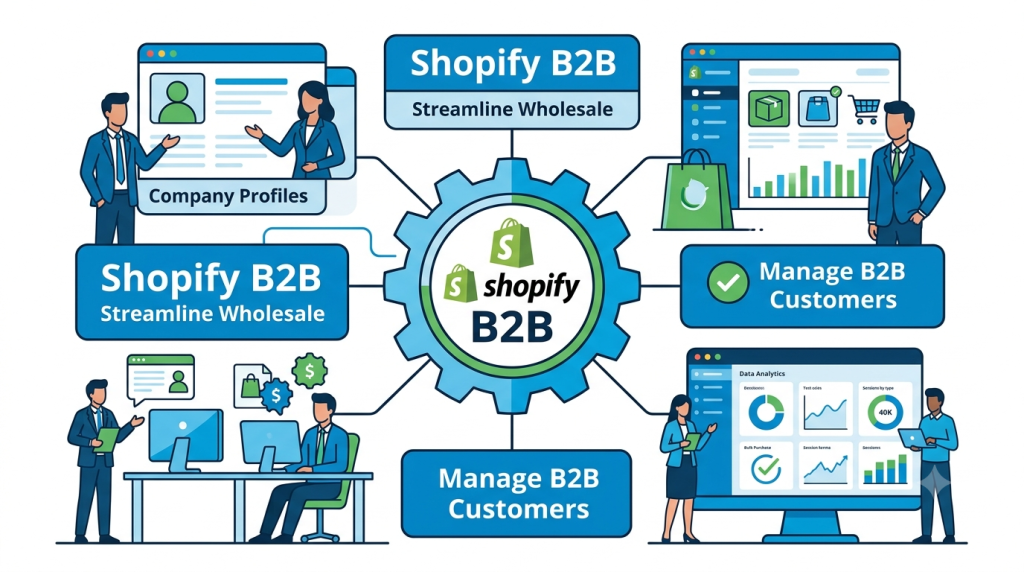
- Built-In B2B Features: Operating both direct-to-consumer (D2C) and wholesale channels traditionally meant maintaining two completely separate tech stacks. Shopify allows merchants to run B2B and D2C side-by-side from a single backend—offering custom price lists, net-payment terms, volume discounts, and B2B company accounts without relying on clunky third-party workarounds.
2.6 Next-Gen Tech Capabilities
- Built-In AI Ecosystem (Sidekick & Magic): Artificial intelligence is deeply woven into the platform to save operators hundreds of hours. Shopify Magic and Sidekick generate high-converting product descriptions, assist with automated image editing, draft personalized customer service workflows, and provide instant data insights through simple conversational prompts.

Leverage Shopify’s intelligent AI companion to navigate your dashboard, answer store questions, and execute tasks instantly.
- Composable & Headless Flexibility: Whether you are launching a lean startup or scaling an enterprise brand, Shopify scales with your technical ambition. Utilizing Shopify Functions (which replace rigid legacy scripts with high-performance WebAssembly extensions) and Hydrogen/Storefront APIs, developers have complete architectural freedom to build fully custom, headless frontend experiences without sacrificing the reliability of Shopify’s backend commerce primitives.
Shopify Headless is a whole another beast for e-commerce operations, I will explain it in a separate article dedicated to it.
As an official Shopify Partner, Ultimate Coder specializes in architecting tailored e-commerce solutions; feel free to reach out to us at info@ultimatecoder.in to discuss your operational needs.
3. Pre-Launch Checklist: Key Considerations Before Building
Before jumping straight into store customization and adding products, taking time to plan your store architecture will save you hundreds of hours of technical debt later. Here are the core pillars to evaluate before laying down your store’s foundation:
3.1 Theme Selection
The theme you choose dictates the entire visual interface (UI), customer journey, and layout flexibility of your online store. Shopify comes with an extensive library of themes equipped with modular, drag-and-drop sections that allow you to build custom page layouts without writing code.
- Free Themes: If you are launching a new business or validating a product concept with standard feature requirements, Shopify’s official free themes (such as Dawn or Sense) provide lightweight, fast, and highly customizable starting points.
- Premium Themes: If your store requires specific layouts, high-volume catalog filtering, built-in megamenus, or specialized visual sections, exploring Shopify’s Premium Theme Marketplace is essential. Investing in a feature-rich premium theme is often far cheaper than building complex customizations from scratch.
- Custom Developer Sections: If even the premium theme marketplace doesn’t offer a specific section or feature your business model requires, you can hire a Shopify Partner Developer to custom-code custom Online Store 2.0/3.0 sections directly into your theme.
- Headless vs. Theme Storefronts: Choose standard theme architectures for speed and cost-efficiency. Reserve headless storefronts for when your business reaches technical maturity and demands complete frontend decoupled flexibility.
3.2 App Hygiene
It is tempting to install an app for every new feature, but unmonitored app installation is the fastest way to bloat your codebase and degrade site performance.
- The “Less is More” Rule: Treat every app as added weight. Prioritize native Shopify features wherever possible, and keep third-party app dependencies to a minimum to protect page load speed and Core Web Vitals.
- Core Stack Selection: Focus on a lean, essential app stack:
- Email & SMS Marketing: Free version Shopify Messaging or paid more powerful apps like Klaviyo or Omnisend for automated retention flows and abandoned cart recovery.
- Customer Support: Gorgias or Tidio for centralized live chat and ticket resolution. You can also use Whatsapp for basic customer support but as the website grows using whatsapp for keeping track of customer support without a dedicated CRM will be very difficult.
- Social Proof: Judge.me, Loox, or Okendo for displaying verified buyer reviews.
- Subscriptions & Recurring Revenue: Recharge or Firmhouse for recurring billing models.
3.3 Data Privacy & Server-Side Tracking
In a post-cookie digital landscape, relying solely on client-side browser tracking leads to inaccurate sales attribution and wasted ad spend.
- First-Party & Zero-Party Data: Focus on capturing zero-party data directly from consumers through post-purchase surveys, interactive quizzes, and account registration incentives.
- Customer Events API & Server-Side Pixels: Configure Shopify’s native Customer Events API alongside server-side pixels (e.g., Meta Conversions API and Google Tag Manager Server-Side). Server-side tracking routes event data directly through Shopify’s secure servers, bypassing ad blockers and browser privacy restrictions for accurate marketing attribution.
3.4 Logistics & Inventory Setup
Fulfillment friction ruins customer retention. Aligning your operational back-end before going live ensures order accuracy from day one.
- Multi-Location Inventory: Map out inventory allocation across all fulfillment hubs, whether you ship from a primary warehouse, a physical retail storefront, or a third-party logistics (3PL) provider.
- Automated Fulfillment Rules: Configure location-based routing and split-shipment logic to ensure orders are fulfilled from the optimal facility nearest to the customer.
- Post-Purchase Returns Management: Establish a seamless self-service return portal and clear policy guidelines to handle exchanges, store credits, or refunds without overwhelming your customer service team.
3.5 What happens if our store goes down during a peak traffic event like a flash sale or festival season?
If your store experiences a massive surge in traffic during a peak flash sale or festival season, you do not need to worry about servers crashing or hosting limits. Shopify operates on a fully hosted, enterprise-grade cloud infrastructure built to handle extreme traffic spikes, massive checkouts per second, and global DDoS attacks automatically. Your store stays online and fully operational without requiring you to manually scale servers or pay extra for peak bandwidth.
However, while Shopify’s servers can effortlessly handle heavy traffic, occasional bottlenecks can still occur due to third-party app scripts slowing down your checkout page, out-of-date inventory syncs, or broken custom code. To prevent any disruptions during high-stakes events, it is best to audit your app stack beforehand, test your checkout flow, and consult a certified Shopify Partner developer if you plan to implement complex custom themes or integrations that require careful stress-testing.
4. Step-by-Step Implementation Strategy
Building a high-performing Shopify store requires a structured, phased approach to ensure every touchpoint—from first click to final delivery—is optimized for conversions and operational efficiency. Here is how to execute your rollout seamlessly:
Phase 1: Brand Foundation & Store Setup
Your store’s foundation sets the stage for customer trust and engagement. Start by securing a clean, memorable custom domain and organizing a intuitive navigation structure that helps shoppers find products effortlessly. The focal point of this phase is designing high-converting Product Detail Pages (PDPs). Incorporating rich media elements like 3D models, augmented reality (AR) virtual try-ons, and high-resolution video allows customers to interact with your products in real time, drastically reducing bounce rates and boosting buy intent.
Phase 2: Checkout & Localized Payment Gateways
Once your storefront design is locked in, shift your focus to eliminating checkout friction. Activate fast-checkout digital wallets such as Apple Pay and Google Pay alongside trusted local payment methods tailored to your target geographic markets. Coupled with Shopify Markets, you can set dynamic pricing rules and automatic currency conversions, ensuring international buyers see accurate local prices, taxes, and payment options without any surprises at checkout.
Phase 3: Automation & Operations
With your storefront live and payment gateways ready, streamline your backend management using Shopify Flow. Set up automated triggers to handle day-to-day operational tasks automatically—such as sending low-inventory alerts to your team, flagging high-risk or fraudulent orders for manual review, and tagging high-value customers as VIPs to enroll them in exclusive loyalty perks. Automating these routine operations saves countless hours and keeps your store running smoothly as order volumes scale.
5. Modern Marketing & Growth Playbook
To drive sustainable growth and maximize customer lifetime value, your store needs a proactive strategy that spans first-party data capture, multichannel social selling, and automated retention systems.
First-Party Data & Owned Channels
As third-party tracking becomes less reliable, capturing and leveraging first-party data directly on your store is paramount. Implement interactive zero-party data mechanics—such as personalized style quizzes, interactive preference centers, and targeted dynamic popups—to learn what your shoppers actually want. Use this rich data to power hyper-personalized email and SMS lifecycle automation. From tailored Welcome sequences and high-converting Abandoned Checkout recovery campaigns to post-purchase cross-sell workflows, communicating with customers based on their explicit preferences dramatically boosts conversion rates.
Meet your customers where they spend their time by converting social feeds directly into storefronts. Integrating your Shopify product catalog with native social channels like TikTok Shop, Instagram/Facebook Shops, and YouTube Shopping allows users to discover and purchase products without ever leaving their favorite apps. Beyond social platforms, syncing your catalog directly with Google Shopping and Meta Shops massively expands your brand’s reach. Google Shopping puts your products directly in front of high-intent searchers, while Meta Shops powers dynamic retargeting across Facebook and Instagram, bringing interested shoppers back to complete their purchases.
AI-Driven Customer Experience
Elevate online shopping by embedding AI directly into the customer journey. AI-powered shopping assistants can answer real-time product questions, offer tailored size or style guidance, and resolve support inquiries instantly. Paired with intelligent recommendation engines that analyze browsing patterns and purchase history, AI ensures every visitor sees highly relevant product suggestions across PDPs, cart drawers, and post-purchase touchpoints.
Retention Strategies
Acquiring new customers is only half the battle; true growth relies on long-term retention. Build predictable, recurring revenue streams by introducing seamless subscription models for consumable products. Complement subscriptions with tiered loyalty programs that reward customers for repeat purchases, referrals, and engagement. Finally, set up automated win-back workflows that trigger targeted offers or personalized re-engagement messages whenever a customer shows signs of slipping away.
6. Key Metrics & Analytics Dashboard
Running a profitable e-commerce store requires tracking the right data to understand where your money goes, how users behave, and how much value your customers bring over time. Monitoring a centralized analytics dashboard helps you make informed decisions rather than guessing.
Acquisition & Traffic Metrics
Understand how efficiently your marketing budget turns into traffic and paying customers by keeping a close eye on your customer acquisition costs.
- Customer Acquisition Cost (CAC) vs. Return on Ad Spend (ROAS): Track how much you spend to acquire a customer compared to the revenue generated by your advertising campaigns to ensure your marketing is truly profitable.
- Click-Through-Rate (CTR) & Traffic Distribution by Channel: Measure engagement across your marketing channels to see which platforms (such as social ads, organic search, or email) drive the highest percentage of interested visitors.
Conversion & Store Efficiency
Pinpoint where friction happens in your sales funnel so you can optimize the user journey from landing page to completed checkout.
- Conversion Rate (CR) by Device Type: Analyze conversion performance separately for mobile and desktop users to spot mobile UX bottlenecks or slow-loading elements.
- Cart & Checkout Abandonment Rates: Monitor how many shoppers add items or start entering checkout details but leave before paying, giving you clear targets for recovery campaigns.
- Average Order Value (AOV) & Units Per Transaction (UPT): Track how much customers spend per order and how many items they buy on average, helping you gauge the effectiveness of cross-selling and bundling strategies.
Retention & Financial Unit Economics
Evaluate the long-term health and sustainability of your business by measuring customer loyalty and bottom-line profitability per order.
- Customer Lifetime Value (LTV) & LTV:CAC Ratio: Measure the total profit a customer generates throughout their relationship with your brand, aiming for an LTV:CAC ratio of 3:1 or higher for a healthy growth model.
- Repeat Purchase Rate (RPR) & Churn Rate: Track how often customers return to buy again, or monitor subscriber cancellation rates if you run a recurring product model.
- Net Contribution Margin per Order: Calculate your true profit per order after factoring in product COGS, shipping, packaging, taxes, and transaction fees.
7. Essential Free Tools & Inbuilt Analytics Every Store Needs
You do not need an expensive suite of software to track your store’s performance and organic growth. Leveraging the right combination of inbuilt Shopify features and powerful free external tools gives you complete visibility into your traffic, customer behavior, and sales data without inflating your overhead.
Inbuilt Shopify Analytics & Dashboard
Shopify comes with robust native analytics built right into your admin dashboard, eliminating the need for paid reporting apps early on.
- Financial & Sales Reports: Instantly track gross and net sales, average order value, total orders, and sales trends over custom date ranges.
- Behavior & Attribution Reports: Monitor online store sessions, conversion rates over time, top-selling products, and traffic sources (including referral channels and social campaigns).
- Inventory & Fulfillment Insights: Keep tabs on sell-through rates, inventory levels, and fulfillment speeds directly from your admin without extra tracking tools.
Google Search Console (GSC)
A non-negotiable tool for organic search visibility, Google Search Console is 100% free and essential for monitoring how your Shopify store performs on Google Search.
- Keyword & Ranking Tracking: See the exact search terms people use to find your store, your average ranking positions, and your click-through rates.
- Indexing & Technical Health: Submit your sitemap ([yourstore.com/sitemap.xml](https://yourstore.com/sitemap.xml)), check for mobile usability issues, and ensure Google can successfully crawl and index your Product Detail Pages and collection pages.
Google Analytics (GA4)
Connecting Google Analytics 4 to your Shopify store provides deep, behavioral insights into how users navigate your site from their first click to final checkout.
- User Journey & Funnel Analysis: Track custom user paths, event engagement, and drop-off points across your entire site.
- Cross-Channel Attribution: Accurately measure the impact of your marketing efforts across social, paid ads, email campaigns, and organic search to understand which channels drive the highest-quality traffic.
8. Common Pitfalls & Mistakes to Avoid
Building and scaling a successful Shopify store is as much about avoiding costly mistakes as it is about executing good strategies. Here are the most frequent traps new and growing merchants fall into—and how to steer clear of them:
- Over-Customizing Theme Code: Resist the urge to rewrite base theme code or add heavy custom code when built-in Online Store 2.0 native sections and app blocks can achieve 95% of what you need. Over-customizing makes theme updates difficult, introduces bugs, and often slows down page load speed unnecessarily.
- Neglecting Mobile-First UX & Site Performance: The modern e-commerce landscape is undeniably mobile-first, and the vast majority of traffic hitting your store will come from mobile devices. If your mobile layout is clunky, slow, or hard to navigate, you will lose sales immediately. Focus on mobile usability, fast load times, and strong Core Web Vitals to convert mobile visitors into buyers.
- Ignoring Zero-Party Data Collection Early On: Waiting too long to collect zero-party data—such as customer preferences, quiz results, and style interests—is a missed opportunity. Building this data bank early lets you send hyper-personalized emails and SMS campaigns from day one.
- Poor Inventory Forecasting: Failing to track sell-through rates and demand trends leads to either stockouts (losing revenue during high-demand periods) or tied-up capital sitting in excess inventory. Use Shopify’s built-in inventory reports to make data-backed restock decisions.
Don’t Be a Perfectionist: Launch, Collect Data, and Optimize
The biggest mistake of all is waiting for every single detail to be flawless before going live. Perfectionism leads to delayed launches and lost momentum. Launch your store once your core foundation, checkout, and product detail pages are solid. Real-world customer behavior and actual store data will show you exactly what needs tweaking—so launch early, collect insights, and continuously optimize as you grow.
9. Conclusion & Actionable Next Steps
Summary: Building an Agile, Data-Driven E-Commerce Business
Launching and growing a successful brand on Shopify does not require complex custom coding or an oversized tech stack. By prioritizing native features like Shopify Markets, Shopify Flow, and built-in AI tools like Sidekick, you can run an agile, highly automated operation without accumulating unnecessary software costs. Focus on establishing a strong mobile-first foundation, leveraging zero-party data for personalized marketing, and relying on accurate analytics from Shopify, Google Search Console, and GA4 to drive your decisions. Remember: perfectionism delays progress. Launch your core storefront, collect real customer data, and iterate based on actual performance.
30-Day Launch Roadmap
Use this quick-start checklist to go from concept to a fully operational, revenue-ready storefront in one month:
- Days 1–10: Brand Setup & Product Data
- Reserve your custom domain and set up brand navigation structures.
- Upload product catalogs with high-converting PDP elements (rich media, detailed descriptions, pricing).
- Configure native payment gateways (Shopify Payments, digital wallets) and enable multi-currency settings in Shopify Markets.
- Set up regional tax calculations and compliance settings within your admin.
- Days 11–20: Core Operations, Marketing & Automated Flows
- Connect free marketing tools: Google Search Console (submit sitemap) and Google Analytics 4.
- Enable Shopify Flow for inventory alerts, high-risk order flagging, and VIP tagging.
- Configure basic email/SMS retention flows (Welcome series, Abandoned Checkout recovery).
- Sync your product catalog with social sales channels (Google Shopping, Meta Shops, TikTok Shop).
- Days 21–30: Testing, Optimization & Public Launch
- Conduct complete test orders across desktop and mobile to ensure smooth checkout performance.
- Audit site speed, mobile UX layout, and Core Web Vitals.
- Activate on-site zero-party data capture tools (quizzes or preference popups).
- Go live, initiate initial acquisition campaigns, and start tracking store performance in real time!

